Find Leads · ICP Studio
The Find Leads tab is an ICP Studio: build a target profile in the left rail, scan Waypath's proprietary intent-signal catalog, hand off the result set to the Prospect buddy for outreach. Everything operator-first, nothing generic.
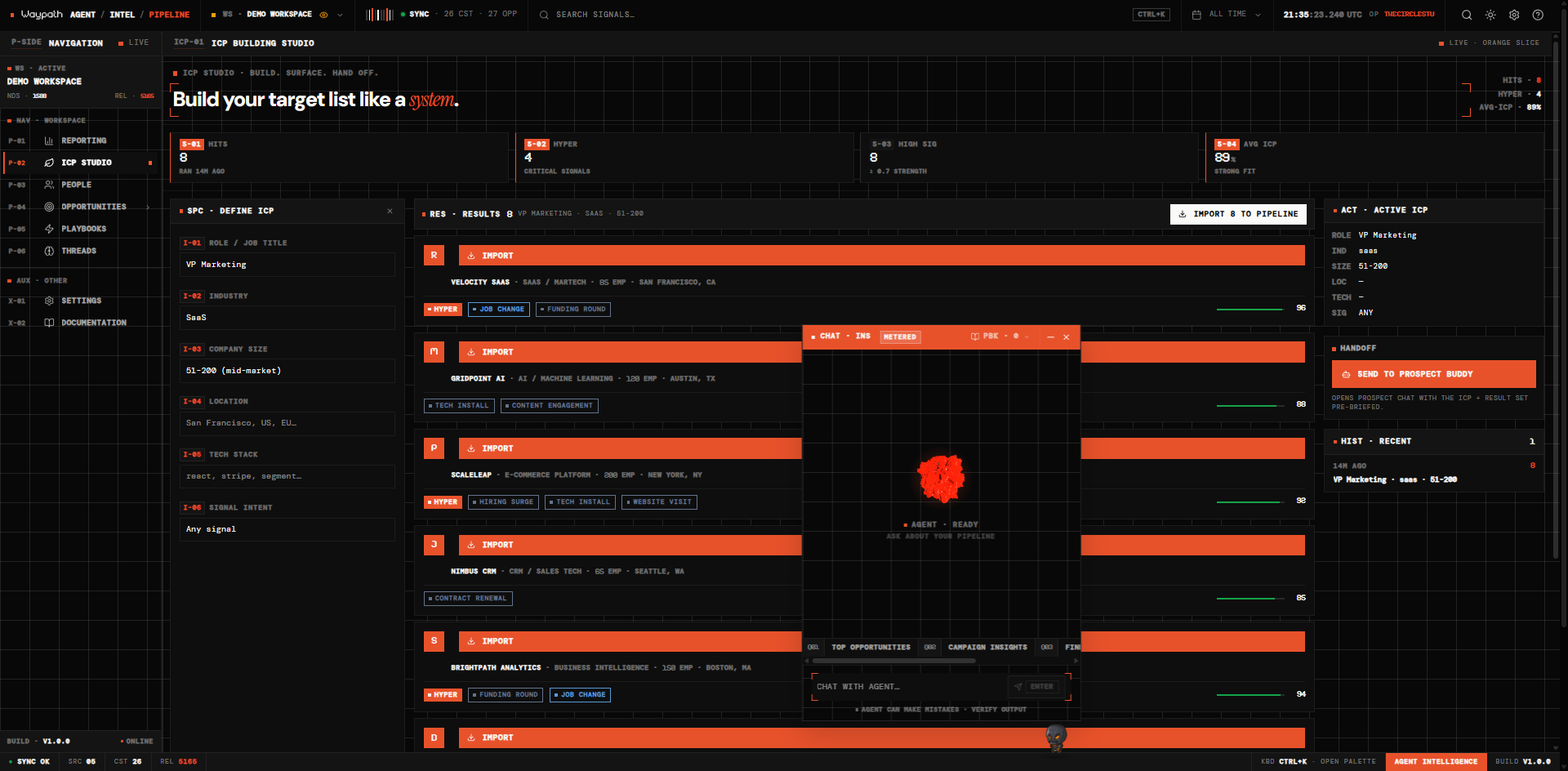
01Layout · three columns
Left · spec studio (320px wide)
Six instrument fields with vermillion code chips, sharp 0-radius inputs, and vermillion focus borders. All six contribute to the active ICP:
| Code | Field |
|---|---|
| I-01 | Role |
| I-02 | Industry |
| I-03 | Size |
| I-04 | Location |
| I-05 | Tech stack |
| I-06 | Signal intent |
Footer: RUN SEARCH primary action.
Center · results stream
Sudo hit count at the top with a bulk IMPORT N TO PIPELINE action. Each prospect card shows:
- Sigil + name + title + company meta (Sudo employee count)
- Signal badges
- Hyper-signal callout (if present)
- ICP score bar (0–100)
- Per-row IMPORT button
Right · active state + handoff (300px wide)
Three stacked panels:
- Active ICP readout: label/value grid reflecting whatever's in the spec studio
- HANDOFF → Prospect Buddy: opens the Prospect buddy's chat with
the active ICP + current result set pre-briefed. A double-
requestAnimationFrameyield ensures the chat panel is mounted before the prompt is sent. - HIST: last 8 searches per workspace, persisted in localStorage. Click to reapply.
02Signal gate
The signal gate (any · high · crit) is a client-side filter applied
to the fetched result set, so the gate has teeth regardless of what the
signal engine returns upstream. Default is any.
03Import path
Clicking IMPORT (row-level or bulk) hits:
POST /api/leads/import
Authorization: Bearer <token>

{ "leads": [ { "name": "...", "email": "...", ... } ] }
This creates:
- A Customer node in the native graph (workspace-scoped)
- A Touchpoint node linking the lead to its source signal
- An
INFLUENCED_BYorATTRIBUTED_TOedge if a campaign/signal source is present
After bulk import, loadGraph() refreshes so the Pipeline People tab
immediately picks up the new rows.
04Hyper-signals → Opportunities
When multiple signals converge on one account (e.g. new VP of Marketing hired + Series B closed + competitor tool adopted), Waypath flags the account with a hyper-signal. Imported hyper-signals automatically surface as Opportunity nodes in Intelligence with composite scores, so the highest-intent prospects show up red on the canvas with zero additional action.
05Rate limiting
Lead Designer searches are rate-limited to 100 requests / hour / workspace. The limiter is workspace-scoped, so running multiple concurrent searches doesn't multiply your budget.
06Demo mode
You can exercise the whole flow in demo mode (apiKey = "demo") with no
paid-tier key required. Signal generation is synthetic but the UX and
pipelines are identical; useful for operator dry-runs and demos.
07ICP score
Each imported lead receives an ICP score from 0 to 100. The score factors firmographic fit, signal strength, and engagement recency. It displays as a horizontal bar in the Pipeline table for quick visual scanning.